
Manage Trades Like a Pro: The Ultimate TPSL Trade Manager for MT5
Trading is Hard. Managing Trades Shouldn’t Be.
We know the feeling. You are in a trade, the market starts moving fast, and you are trying to calculate your Take Profit (TP) and Stop Loss (SL) levels. You are frantically trying to figure out how much money you will lose if the price hits your stop level.
If you are on a Micro or Cent account, it gets even harder. You have to do math in your head to convert “standard lots” to “micro lots.”
One mistake, and you could lose more than you planned.
At Trading Bot Lab, we built a solution. Introducing the TPSL Trade Manager, a custom tool for MetaTrader 5 designed to handle the math, the speed, and the risk for you.
What is the TPSL Trade Manager?
This isn’t an auto-trading bot that guesses where the market will go. This is a Assistant Bot that helps you trade better.
It sits on your chart and acts as a control panel. It monitors your margin, calculates your potential profits in real-time, and lets you close trades faster than any human hand could click.
Key Features & Functionalities
Here is why this tool is a “must-have” for every manual trader.
1. Visual “Drag and Drop” Management
Stop typing numbers into the terminal. With our tool, you don’t need to calculate price levels manually.
How it works: A horizontal line appears on your chart. You simply drag it up or down with your mouse.
The Benefit: As you move the line, the tool calculates exactly how much profit or loss you will have if the price hits that line. You see the result before you set it.
One-Click Set: Once you like the level, click the “Set TP SL” button, and the tool updates all your open orders instantly.
2. The “Micro Lot” Math Fixer
If you trade on Cent or Micro accounts, you know the struggle. On a Standard account, 1.00 lot is 100,000 units. On a Micro account, 1.00 lot might only be 1,000 units.
The Problem: Most generic tools assume everyone is using a Standard account. This leads to wrong risk calculations.
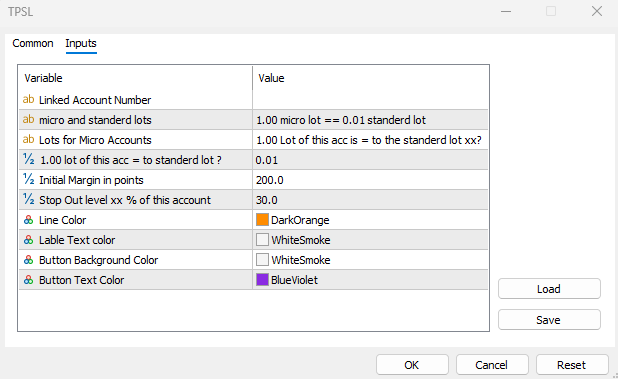
Our Solution: We added a special input feature where you can tell the bot your account type (e.g., 1.00 Micro Lot = 0.01 Standard). The tool automatically normalizes the math so you always know your true risk exposure.
3. Lightning Fast “Bulk” Closing
When news hits, slippage is your enemy. If you have 10 positions open, closing them one by one takes too long.
Async Technology: We coded this tool using high-performance “Asynchronous Mode.”
What that means for you: When you click “Close All,” “Close Buy,” or “Close Sell,” the bot doesn’t wait for the broker to confirm the first trade before sending the second. It sends all close requests instantly. It clears your risk in milliseconds.
4. The Live Dashboard
The default MT5 “Toolbox” takes up screen space and is hard to read. Our tool puts a clean, customizable dashboard right on your chart background.
Real-Time Stats: See your Total Trades, Buy vs. Sell Lots, Net Profit, and Equity at a glance.
Margin Alerts: If your Margin Level drops below 100%, the text turns RED. This is your visual alarm to take action before you get a margin call.
Why Do You Need This Tool?
Professional trading is about Risk Management, not just predicting the future.
It saves time: No more manual calculations.
It prevents errors: No more “fat-finger” mistakes typing in the wrong price.
It reduces stress: Knowing exactly where your equity stands gives you the confidence to hold winners and cut losers.
How to Get Started
Using the TPSL Trade Manager is simple:
Attach the EA to your MT5 chart.
Set your account lot ratio in the inputs (if using a Micro account).
Choose your favorite colors for the buttons and lines.
Start trading with confidence.
Trading involves risk. Always use tools that help you manage that risk effectively.